Introducing:
Explore TRUMBULL
Some people prefer to drive backroads, some like the highway, and others might like to use public transportation, but in the end, each person made it to their destination. This basic concept is the reason designers would take the time to build a flow chart. Flow charts are the visual representation of the individual steps a user took to complete a process. They are essential for designers to gain an understanding of the user and to help reduce misunderstandings. They are also an excellent tool for sharing methods with others like developers or clients.
How To Create Flow Charts
Before you begin:
- Take some time to understand the various users of the products.
- Ask what motivates them, what their needs are and if they have any questions.
- Start to outline the steps they would need to take to complete their goals.
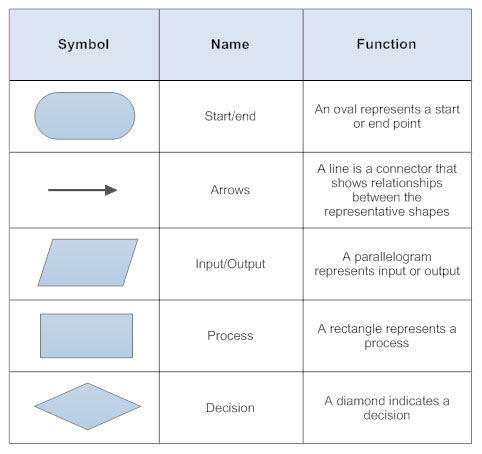
It is best to use standard flow chart symbols so everyone can easily understand. Use arrows to connect each step and keep the arrow flow to one side. Last, name each step clearly and concisely.
Applying these Principles
Recently, I took on the challenge of creating an app for my town, Trumbull. I created the information architecture, conducted user research, and named it Explore Trumbull. I also made three different flow charts for three separate users. Here is my process:
Purpose of Explore Trumbull
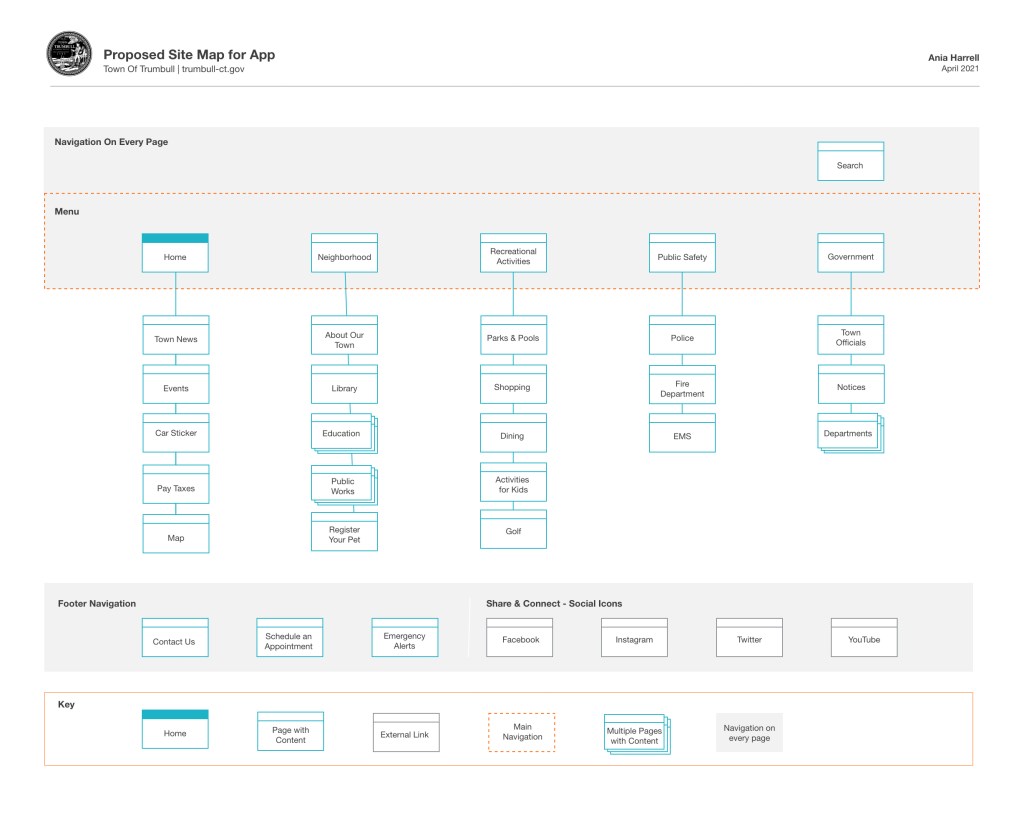
From new to lifelong residents, the Explore Trumbull app is a pocket resource to help town citizens stay up to date on town news, find local events, and even pay taxes quickly. The app will also feature an interactive map of the parks and other recreation Trumbull has to offer. The purpose of Explore Trumbull is to help residents stay abreast of what’s happening in their community and to partake in all of the amenities Trumbull has to offer.
Functions
The primary functions of the app will include
- Local news and alerts
- Ability to pay taxes
- Calendar of events
- Sign-ups for town activities
- Map of landmarks such as town hall, libraries, golf and parks
- List of departments.
Target Audience
- New Residents
- Current Residents
- Involved Residents
Needs
- Pay Taxes easily
- Get town contact information
- Find the town landmarks and amenities on a map
- Sign up for town activities such as exercise classes, swim lessons, continuing education

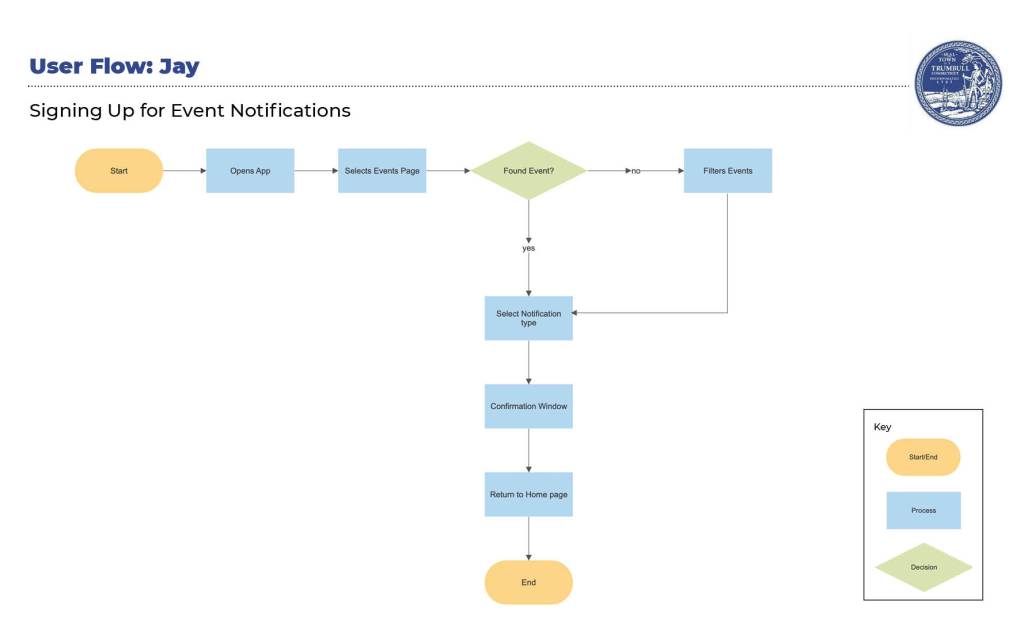
Jay – New Resident
“As an active dad, I need to see the town calendar of events. I don’t want to miss out on the fun events my town has to offer, like the concerts on the green, summer fireworks, and the parks and pools.”
Scenario
The weather is warming, and Jay heard that the town puts on summer concerts. He wants to take his two young kids to enjoy music and get some ice cream as a special treat. He heard about the town app and wants to set up notifications to be alerted of when the concerts are, who is playing, and the type of music.

Melanie – Current Resident
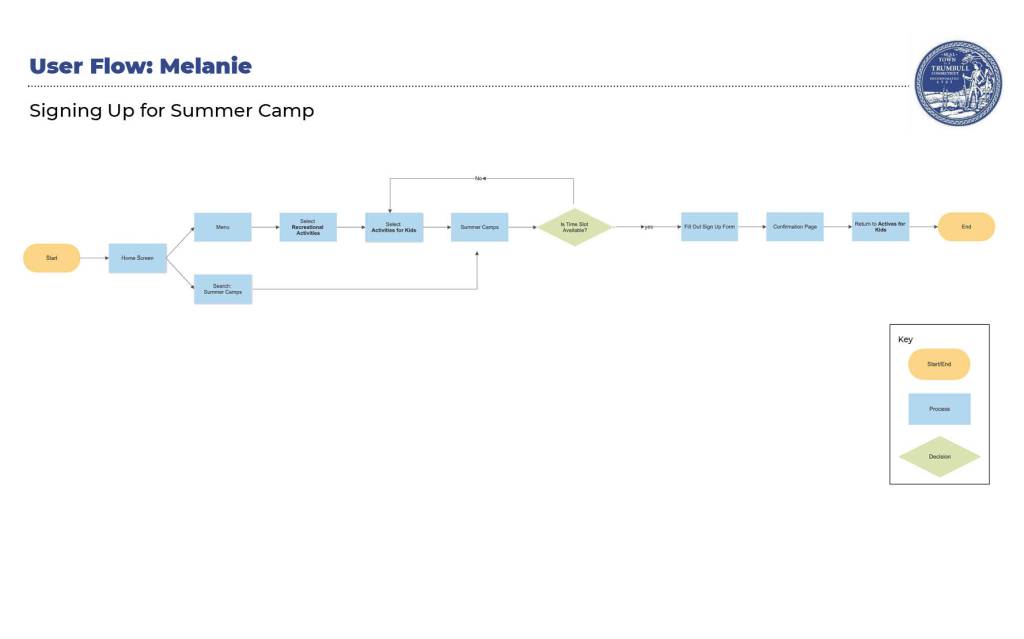
“As a resourceful mother, I need to sign my kids up for the town camps and swim lessons so they can socialize with friends and I can get my work done from home.“
Scenario
While cleaning out her son’s backpack, Melanie found a town flyer announcing summer camp registration is open. The flyer states she can now sign her kids up through the town app. She’s excited to try it out because, in the past, the town website version was challenging to navigate.

Peter – Lifelong Resident
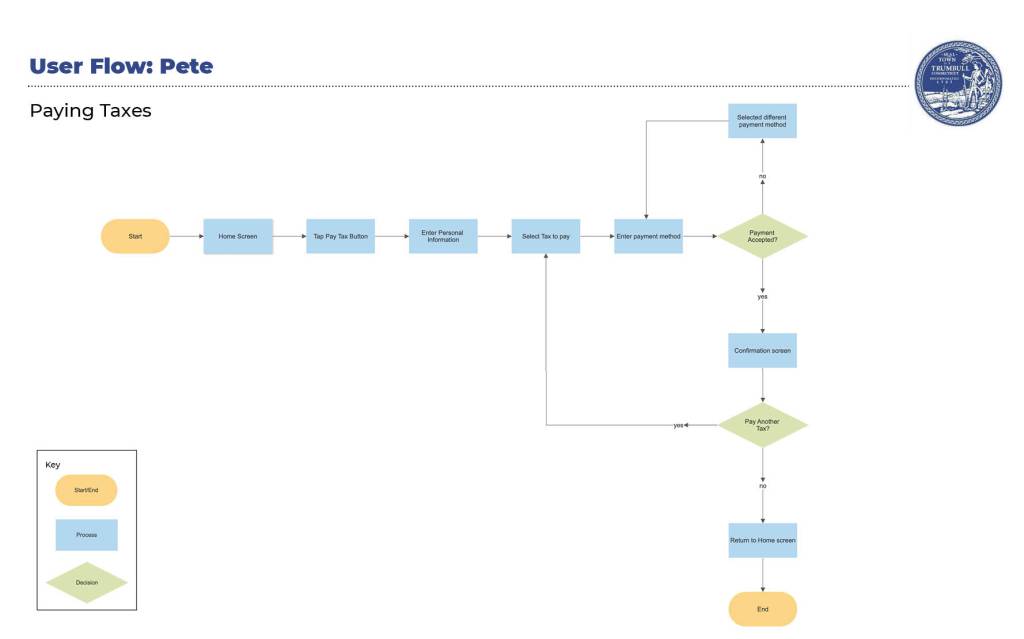
“As a longtime resident, I want to pay my taxes online because I prefer the convenience of an app overwriting a check and mailing it in.”
Scenario
Pete’s property tax statement just came in the mail today, and it says he can now pay using the town app. As a longtime taxpayer, he wants to use this new technology because he knows his tax dollars paid for it. He hopes the app works well and it was money well spent. He is also happy that he does not have to take time out of his day to go to Town Hall and risk exposure to the virus.
Wrapping Up
Flow charts may look straightforward and logical, however creating them is not an easy task. As I mentioned before, it’s difficult to determine if your user prefers the highway or backroads to get to their destination, or maybe it’s a way you haven’t even dreamed of. There can also be roadblocks that need to be overcome. Taking the time to figure out the various steps a user would take to reach their goal is an excellent process for a designer. It will give a deep understanding of the user and help make the path to their goal seamless and enjoyable.
 To Mulberry Street Marketing & Design
Leave a comment